
Student Registration
All student registrations are processed through California Tamil Academy (CTA). Please follow our step-by-step branch guide below, paying special attention to UK-specific form inputs and defect workarounds.
Have this guide open on one tab while completing your registration on CTA.
Overview for New Families
Please follow the step-by-step instructions below. Because the California Tamil Academy (CTA) platform was originally designed for US schools, there are a few important UK-specific workarounds (postcodes, cities, defect workarounds) you must follow carefully.
Access Portal & Answer CTA Previous Enrollment Question
Visit https://www.catamilacademy.org/cta/login.aspx.
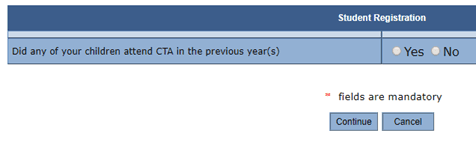
You will get the screen below asking whether any of your children attended CTA in the previous year. Answer based on your family's status:
- If you are completely new to CTA, select "No" and proceed to create your parent profile.
- If you already have a login from previous years or another branch, select "Yes" and log in.
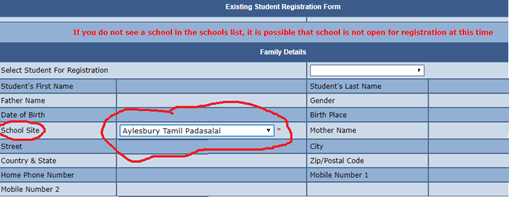
Select School Site: Aylesbury Tamil Padasalai
Follow through the forms and fill in the parent and student details.
Branch & UK-Specific Input Rules (Important!)
Please do not enter your UK postcode (e.g. HP18 0WS) because the CTA portal doesn't accept letters/characters in the ZIP field. Enter numbers like 100 instead.
If entering birthdates or dates manually rather than using the calendar picker, please enter in US format: mm/dd/yyyy (e.g. 05/18/2018).
Where city is a dropdown, please select UK-OTHER. In the bottom section where City is specified, select or enter UK-Aylesbury.
Critical defect alert: Fill the Public school type first! Whenever you change Public school type, whatever you have typed in the Public school name column gets cleared/becomes blank.
Sign Rules & Regulations Agreements
You will need to accept the terms and conditions and agree to the 2 CTA rules and regulations screens.
- Key in your full Name at Parent / Guardians' name.
- If the child's name is not pre-filled, please fill it in. It has to exactly match how you registered the child on the first screen.
Select 'Pay in person' & Submit
Click Submit. Once the registration is complete, you will receive a confirmation email from CTA.
Registering Siblings / Multiple Children
If you have more than one child to enroll, please register the first child completely.
Once you get the confirmation email, log in using your account credentials and use the 'Parent Access / Child Registration' menu to register siblings. This avoids having to re-enter your family information!
School Fee & Bank Transfer Details
Annual fees cover California Tamil Academy global curriculum textbooks, semester assessment papers, Sunday classroom facility rental, and the children's library circulation. Please transfer fees using your UK banking app: